Home › Supported Devices
Which devices work with EagleStream
EagleStream runs on one application — IBO Player — and IBO Player runs almost everywhere. This page lists exactly which hardware is supported, which needs a workaround, and which we honestly recommend against, so nobody pays for a subscription that will not start.
The short answer
If your television, stick, box, phone or computer was made in roughly the last six years and can install apps, it will almost certainly run EagleStream. The supported platforms are Android, Android TV, Amazon Fire TV, Windows, macOS, LG webOS and Samsung Tizen.
Remember that a subscription streams on one device at a time. You can install IBO Player on several devices and move between them, but two screens playing simultaneously needs two subscriptions from the pricing page.
Hardware we install on every day
 Amazon Fire TV
 Android TV boxes
 Windows 10 / 11
 MAG boxes
 Enigma2 receivers
 Roku (screen mirroring)
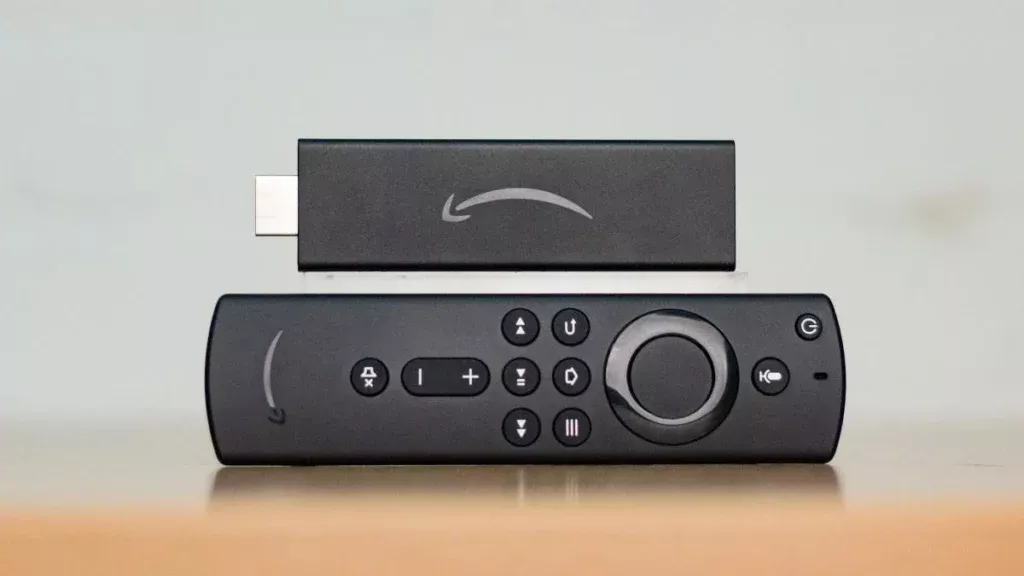
Amazon Fire TV Stick & Cube
The most popular choice among our subscribers, and the cheapest way to turn an older television into a streaming set. Installation uses the Downloader app and a short numeric code — the exact steps are in the setup guide. Fire TV Stick 4K or 4K Max is worth the extra for 4K channels.
Android phones, tablets & TV boxes
The smoothest experience overall. Download the installation file, allow the install, open the app and add the playlist. Android TV boxes such as the Nvidia Shield, Formuler, BuzzTV, X96 and H96 all behave the same way.
LG webOS & Samsung Tizen smart TVs
No extra hardware required. Search for "IBO Player" in the LG Content Store or the Samsung Apps store, install it, and note the device key shown on first launch. Ignore similarly-named clones — only the exact "IBO Player" listing is supported.
Windows 10 & 11
A 64-bit desktop installer is available. Windows SmartScreen will warn you because the file comes from outside the Microsoft Store — choose More info, then Run anyway, and complete the usual installer steps.
macOS — MacBook & iMac
Download the macOS build, drag it into Applications, then approve it once under System Settings › Privacy & Security › Open Anyway. After that first approval it launches normally every time.
MAG & Enigma2 receivers
Older set-top hardware is supported through a portal or playlist URL rather than the app store. Send support your device model and MAC address and we configure the line for it directly.
Devices that need a workaround
Roku. IBO Player is not published for Roku. Roku owners stream by mirroring from an Android phone or a Windows laptop, which works but adds a step and can soften picture quality. If Roku is your only device, a $30 Fire TV Stick is the better answer.
Game consoles. Xbox and PlayStation browsers cannot install IBO Player. We do not recommend them as a primary device.
Very old smart TVs. Televisions from before roughly 2018 often run app stores that no longer accept new installations. An external stick or box solves it for less than the price of an annual subscription.
Not sure where your hardware lands? Send the make and model to support before you order. We will tell you plainly whether it works — including when the answer is no.
What your connection needs
| Quality | Resolution | Recommended speed | Best for |
|---|---|---|---|
| 4K UHD | 2160p | 25 Mbps or more | Large TVs, live sport, premium film titles |
| Full HD | 1080p | 10 Mbps or more | Most households, most channels |
| HD | 720p | 5 Mbps or more | Tablets, second screens, rural connections |
| SD | 480p | 3 Mbps or more | Mobile data and weak Wi-Fi |
A wired ethernet connection beats Wi-Fi every time for 4K on a main television. If you must use Wi-Fi, the 5 GHz band with the device in line of sight of the router makes a visible difference.
Device confirmed? Start watching.
Order the CA$10.99 introductory month, follow the installation guide for your hardware, and the full 51,000-channel grid loads in minutes.